Exposed Live Chat Events Reference
Updated
Live Chat exposes certain events that help you analyze customer interactions and agent activity. Each event corresponds to a specific action, such as starting a new conversation, opening or closing the chat window, clicking buttons, or engaging with surveys and calls.
Supported Events
Conversation
Event Name | Description |
NEW_CONVERSATION_STARTED | Customer clicked on new conversation button |
NEW_CONVERSATION_CREATED | New conversation created |
NEW_CONVERSATION_STARTED | New conversation started |
CONVERSATION_WINDOW_OPENED | Customer clicked on chat trigger icon |
CONVERSATION_WINDOW_CLOSED | Customer clicked on minimized chat window |
EXISTING_CONVERSATION_OPENED | Customer opened existing conversation |
CONVERSATION_CLOSED | Customer closed the conversation |
CONVERSATION_DELETED | Customer deleted the conversation |
CONVERSATION_EXPORTED | Customer saved the conversation |
CONVERSATION_BACK_PRESSED | Customer clicked back from a conversation |
CONVERSATION_LIST_BACK_PRESSED | Customer clicked back from list of conversations |
SESSION_ACTIVE | Session Active |
Interactions
Event Name | Description |
BUTTON_CLICKED | This will do reporting on types of button clicked |
OPEN_URL_BACK_PRESSED | Open URL back pressed |
ATTACHMENT_BUTTON_CLICKED | Attachment button clicked |
SEND_BUTTON_CLICKED | Send button clicked |
LINK_CLICKED | Link clicked |
LOCATION_SHARING_CLICKED | Location sharing clicked |
SPRINKLR_ENTITIES_BACK_PRESSED | Sprinklr Entities back pressed |
FORM_ERROR | Form error |
INFO_CARD_OPENED | Info card opened |
INFO_CARD_CLOSED | Info card closed |
PAGE_OPENED | Page opened |
WIDGET_MAXIMIZED | Widget maximized |
WIDGET_MINIMIZED | Widget minimized |
Chat Trigger
Event Name | Description |
TRIGGER_VISIBLE | Number of times chat trigger icon was visible |
CHAT_TRIGGER_REMOVED | Chat trigger removed |
CHAT_TRIGGER_CLICKED | Chat trigger clicked |
TRIGGER_DRAGGED | Trigger dragged |
Agent
Event Name | Description |
AGENT_ASSIGNED | Agent was assigned |
Video and Audio Call
Event Name | Description |
VIDEO_CALL_OUTGOING_STARTING | Video call started |
VIDEO_CALL_CARD_CTA_CLICKED | CTA clicked from video call card |
VIDEO_CALL_LAUNCH_CLICKED | Video call launch clicked |
VIDEO_CALL_LAUNCHED | Video call launched |
VIDEO_CALL_JOIN_CTA_CLICKED | Video call join CTA clicked |
VIDEO_CALL_JOIN_BACK_CTA_CLICKED | Video call join back CTA clicked |
VIDEO_CALL_END_CLICKED | Video call end clicked |
AUDIO_CALL_OUTGOING_STARTING | Audio call started |
AUDIO_CALL_CARD_CTA_CLICKED | CTA clicked from audio call card |
AUDIO_CALL_LAUNCH_CLICKED | Audio call launch clicked |
AUDIO_CALL_LAUNCHED | Audio call launched |
AUDIO_CALL_JOIN_CTA_CLICKED | Audio call join CTA clicked |
AUDIO_CALL_JOIN_BACK_CTA_CLICKED | Audio call join back CTA clicked |
AUDIO_CALL_END_CLICKED | Audio call end clicked |
Survey
Event Name | Description |
SURVEY_BACK_PRESSED | Customer clicked back from survey |
SURVEY_SUBMITTED | Survey submitted |
SURVEY_CANCELLED | Survey cancelled |
Guided Workflow
Event Name | Description |
GUIDED_WORKFLOW_BACK_PRESSED | Guided workflow back pressed |
GW_CLICKED | Guided workflow clicked |
Knowledge Base
Event Name | Description |
KNOWLEDGE_BASE_LIST_BACK_PRESSED | Knowledge base list back pressed |
KNOWLEDGE_BASE_BACK_PRESSED | Knowledge base back pressed |
KB_ARTICLE_CLICKED | KB article clicked |
KB_FOLDER_CLICKED | Knowledge base folder clicked |
User
Event Name | Description |
USER_PROFILE_UPDATED | User Profile Updated |
USER_PROFILE_UPDATE_FAILED | User profile update failed |
USER_UPDATED | User updated |
USER_UPDATE_FAILURE | User update failure |
Proactive Prompt
Event Name | Description |
PROACTIVE_PROMPT_TRIGGERED | Proactive prompt triggered |
PROACTIVE_PROMPT_ENGAGED | Proactive prompt engaged |
PROACTIVE_PROMPT_CLOSED | Proactive prompt closed |
Call
Event Name | Description |
CALL_PAGE_MINIMISED | Call page minimised |
CALL_PAGE_MAXIMISED | Call page maximised |
CALL_ENDED | Call ended |
CALL_DECLINED | Call declined |
CALL_MISSED | Call missed |
CALL_FAILED | Call failed |
Proactive Conversation
Event Name | Description |
PROACTIVE_CONVERSATION_TRIGGERED | Proactive conversation triggered |
PROACTIVE_CONVERSATION_ENGAGED | Proactive conversation engaged |
PROACTIVE_CONVERSATION_CLOSED | Proactive conversation closed |
Text-to-Speech (TTS) / Speech-to-Text (STT)
Event Name | Description |
TTS_CLICKED | Text‑to‑speech clicked |
TTS_FAILED | Text‑to‑speech failed |
STT_CLICKED | Speech‑to‑text clicked |
STT_FAILED | Speech‑to‑text failed |
Personal Shopper
Event Name | Description |
PERSONAL_SHOPPER_LAUNCH | Personal Shopper launched |
PERSONAL_SHOPPER_BACK_PRESSED | Personal Shopper back pressed |
CART_OPEN | Cart Page open |
How to Plot?
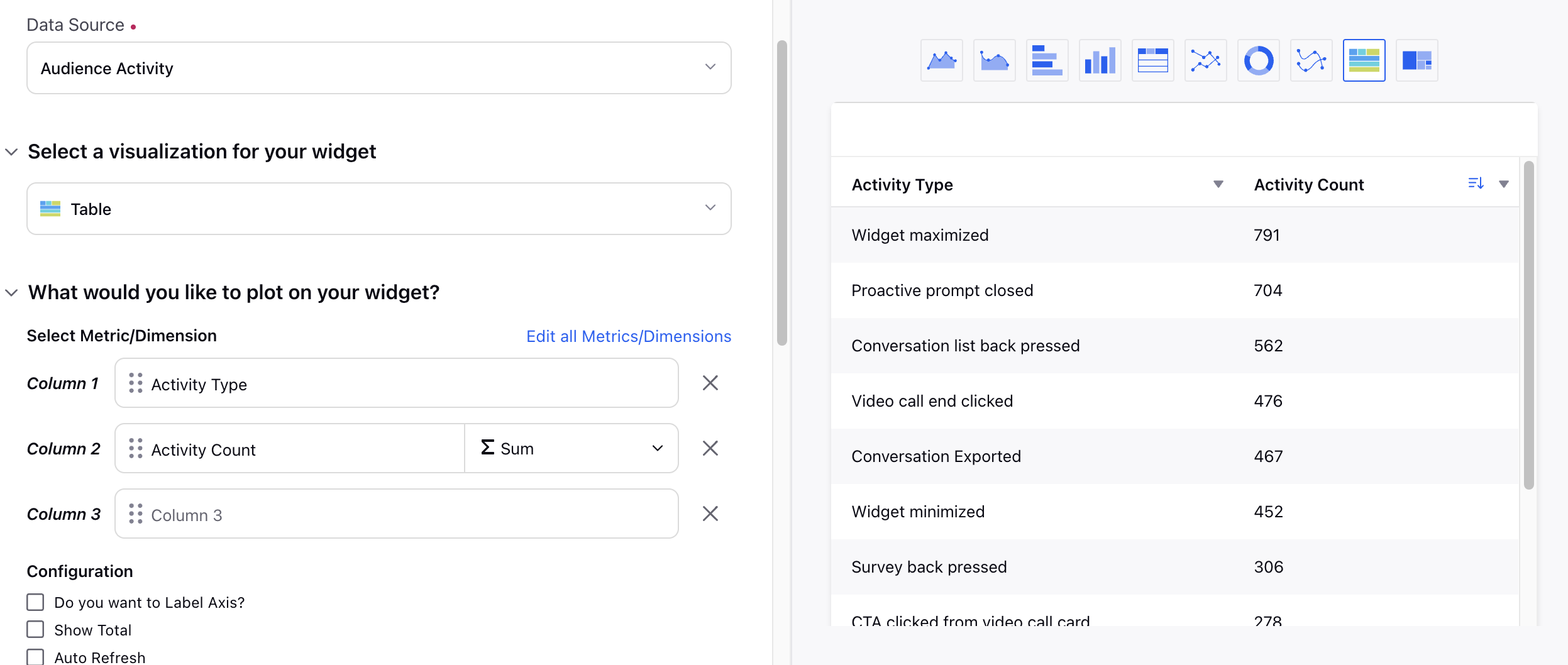
These events can be plotted in a Care Reporting widget by using the Audience Activitity Data Source and selcting Activity Type and Activity Count as dimensions. Further, in additional filters you can select your Livechat account(s).